Moving Next.js Builds Off Production (and Why It Took Two Hours)

This site recently crossed an invisible but important threshold: the point where development activity started to materially interfere with production stability.
The trigger was simple and unglamorous. While doing active Next.js / React development directly on the production host, next build began to intermittently push the server into memory pressure. Swap usage climbed, build times stretched, and eventually I started seeing OOM behavior. Nothing crashed outright, but the direction was clear. Production was no longer “boring”.
That was the line.
What followed was a fast but deliberate migration of all heavy development and build work off the production server and onto a local machine, with production reduced to exactly what it should be: a runtime environment.
This post documents that conversion.
The Original Problem
The production host was doing too much:
-
Running the live site
-
Running
next devduring active development -
Running
next buildfor deployments -
Holding Node tooling, caches, and dev dependencies
Modern Next.js builds are CPU and memory hungry. They parallelize aggressively, and they should. But that assumes you have cores and RAM to burn. A small production server is not the place for that kind of workload.
Once builds started flirting with OOM, it was no longer theoretical. The architecture had to change.
The Goal
The goal was not just “move dev somewhere else”. It was to make production boring again.
Specifically:
-
No builds on prod
-
No dev tooling on prod
-
No file watching on prod
-
No accidental dependency on prod state during development
-
Faster builds using more cores
-
Identical runtime behavior between dev and prod
And I wanted to do it quickly, without redesigning the entire system.
The Chosen Architecture
I moved development to a local Ubuntu Server VM running under VirtualBox on a Windows 11 Pro workstation.
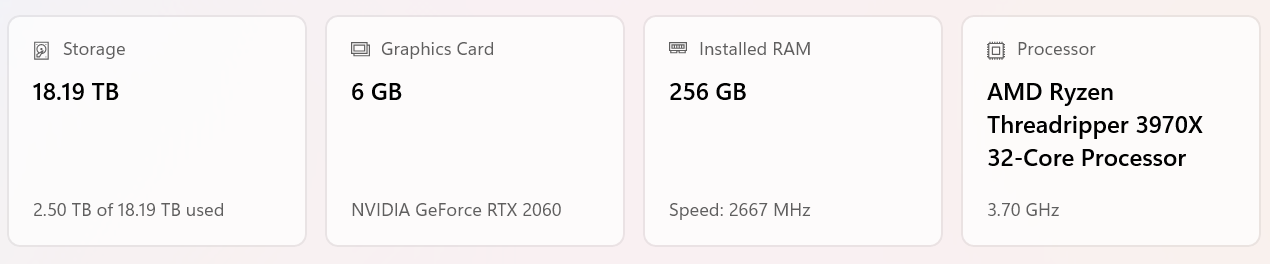
Why a VM instead of WSL?
Because I needed WireGuard, and I did not want to spend time wrestling with WSL networking edge cases, split DNS, or tunnel routing oddities. A real Linux VM with a real network interface was the fastest path to something predictable.
The final setup looks like this:
-
Host: Windows 11 workstation
-
VM: Ubuntu Server, 6 vCPUs, 16 GB RAM, NVMe-backed disk
-
Network: Bridged NIC + WireGuard client
-
Prod: Remote Linux server running WireGuard server, nginx, pm2
-
Tunnel: 10.7.0.0/24 WireGuard network
The VM connects to prod over WireGuard, and nothing else changed about production’s external exposure.
Development Moves Local
All application code was rsynced from prod into the VM. From that point forward:
-
npm install -
next dev -
next build
only happen locally.
The impact was immediate. Builds that were borderline on prod suddenly ran fast and clean, using multiple cores properly instead of fighting the kernel for memory.
This alone justified the change.
Environment and Connectivity
Local development still needs to talk to real services:
-
MariaDB
-
Redis
-
APIs
-
Other internal systems
Rather than mocking or duplicating infrastructure, the dev VM connects directly to prod services over WireGuard.
That required a few deliberate steps:
-
Dedicated database user for dev, scoped to the WireGuard IP
-
Linode firewall rules updated to explicitly allow the WireGuard subnet
-
Hard separation of dev and prod credentials
-
Zero reliance on localhost fallbacks in application code
Once that was in place, dev behaved like prod, just closer.
Media Handling and nginx
One subtle issue surfaced immediately: media.
In production, nginx owns media paths and serves them directly from disk. Next.js never touches those files. When dev moved off prod, that implicit dependency became visible.
Rather than teaching Next about media, I restored the original contract.
In dev, nginx now sits in front of the app exactly like prod does. For media, nginx simply proxies /media requests back to production. No syncing, no duplication, no local state.
Media is prod-owned. Dev is read-only. That rule is now explicit.
The Build and Deploy Model
With dev and prod properly separated, deployment became simple and intentional.
The model is:
-
Build locally
-
Sync only build artifacts to prod
-
Install runtime dependencies on prod
-
Reload the app
Specifically:
-
Builds happen via
npm run buildon the VM -
Only
.next,public,package.json, andpackage-lock.jsonare rsynced -
Dev-only artifacts like
.next/devand build caches are excluded -
Prod runs
npm ci --omit=dev -
pm2 reloads the process using the existing ecosystem file
Production never builds. It only executes known output.
This surfaced a few missing dependency classifications initially, which is exactly what should happen when you stop relying on devDependencies at runtime. Once corrected, the system stabilized.
Why This Matters
This change was not about optimization for its own sake. It was about restoring proper boundaries.
-
Production is now CPU-quiet and memory-stable
-
Builds use all available cores locally
-
Dev failures cannot affect prod
-
Deploys are repeatable and mechanical
-
The system is easier to reason about
Most importantly, nothing is accidental anymore. If something runs in prod, it is there because it was intentionally promoted.
The Result
In the span of roughly two hours, development moved entirely off production without downtime, without redesigning the app, and without adding unnecessary tooling.
The production server is once again boring.
And that is exactly what it should be.